Building a Self-Healing Web Scraper with Bright Data Scraper Studio
Web scrapers are brittle by nature. A site redesigns its layout, renames a CSS class, reshuffles column order — and your scraper silently returns zero records. You find out when the data stops showing up, not when the break happens.
I built a pipeline that fixes this automatically. It detects a broken scrape, fetches the live page, analyses what changed, and rewrites the parser — all without any human intervention. This post walks through how it works and how I used Bright Data Scraper Studio’s APIs to make it happen.
The full source is on GitHub: HiteshRepo/screener-selfheal Demo video: Watch on Google Drive
The Problem
Every scraper has selectors — CSS paths that tell it where to find data on a page. Those selectors are hardcoded at build time. When a site changes its HTML structure, the selectors find nothing. The scrape returns empty. You’re blind until someone notices.
The standard fix is manual: someone spots the breakage, opens the scraper config, updates the selectors, redeploys. That’s fine for a hobby project. For a production data pipeline running on a schedule, it’s a gap you can’t afford.
The Architecture
The pipeline has two flows: a normal scrape path and a self-heal path that kicks in automatically when things break.
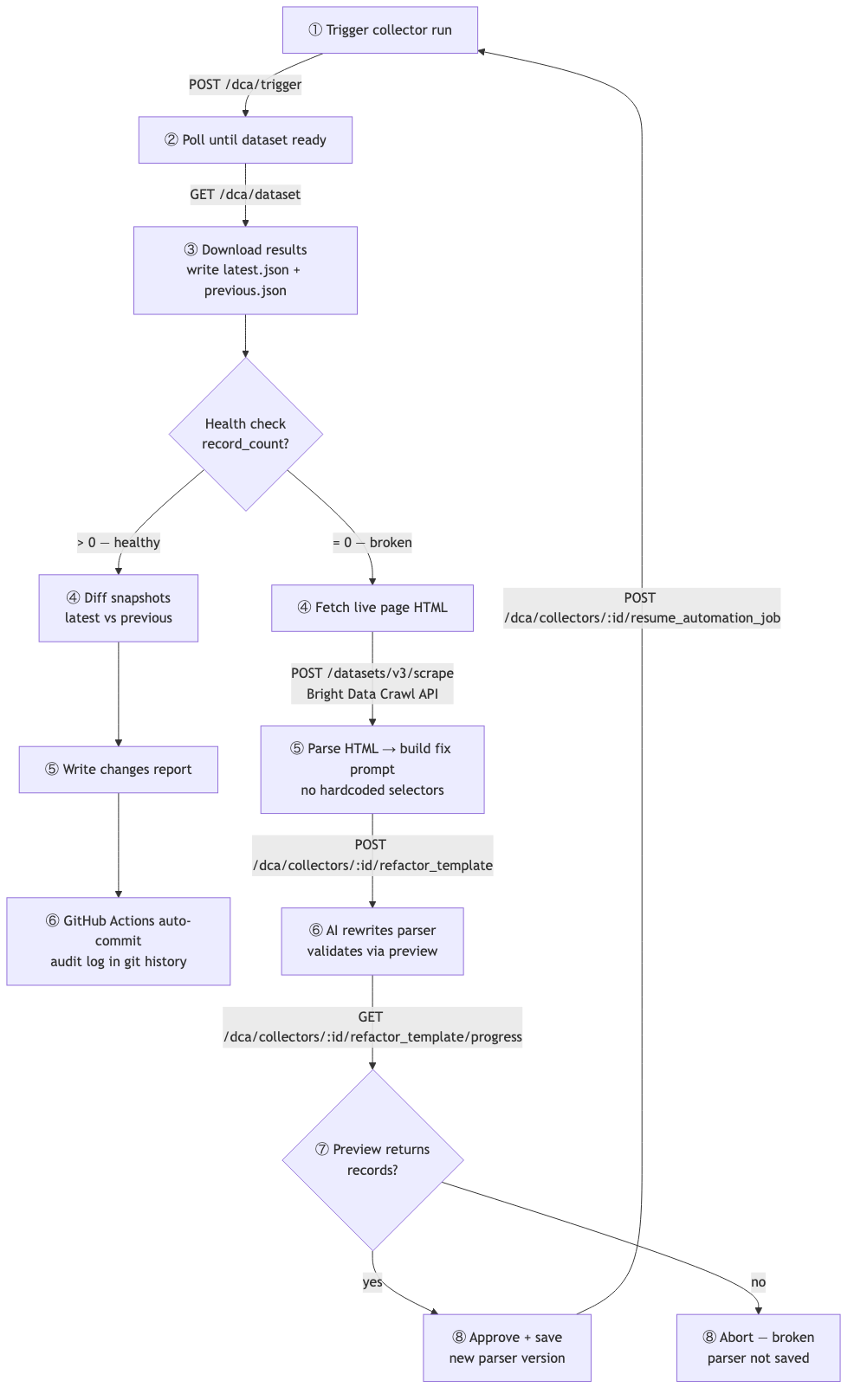
Normal flow:
- Trigger a Bright Data Scraper Studio collector run via
POST /dca/trigger - Poll
GET /dca/datasetuntil the dataset is ready - Download results — write
latest.json, rotate previous snapshot toprevious.json - Health check: if
record_count > 0, run the diff engine and commit the results - GitHub Actions auto-commits
latest.jsonand a dated changes report tomain— git history becomes a timestamped audit log
Self-heal flow (when record_count = 0):
- Fetch the live page HTML via Bright Data’s Crawl API (
POST /datasets/v3/scrape) - Parse the HTML with BeautifulSoup — dynamically discover the table class, tbody class, and column headers
- Build a natural-language fix prompt from what’s actually there — no hardcoded layout lookup
- Send the prompt to
POST /dca/collectors/:id/refactor_template— Bright Data’s AI rewrites the parser - Poll
GET /dca/collectors/:id/refactor_template/progress— validate thepreview_result - If preview returns records:
POST /dca/collectors/:id/resume_automation_job— approve and save the new parser version - If preview returns nothing: abort — broken parser is never saved
The Bright Data Setup
Two Scraper Studio collectors, one for production and one for the demo:
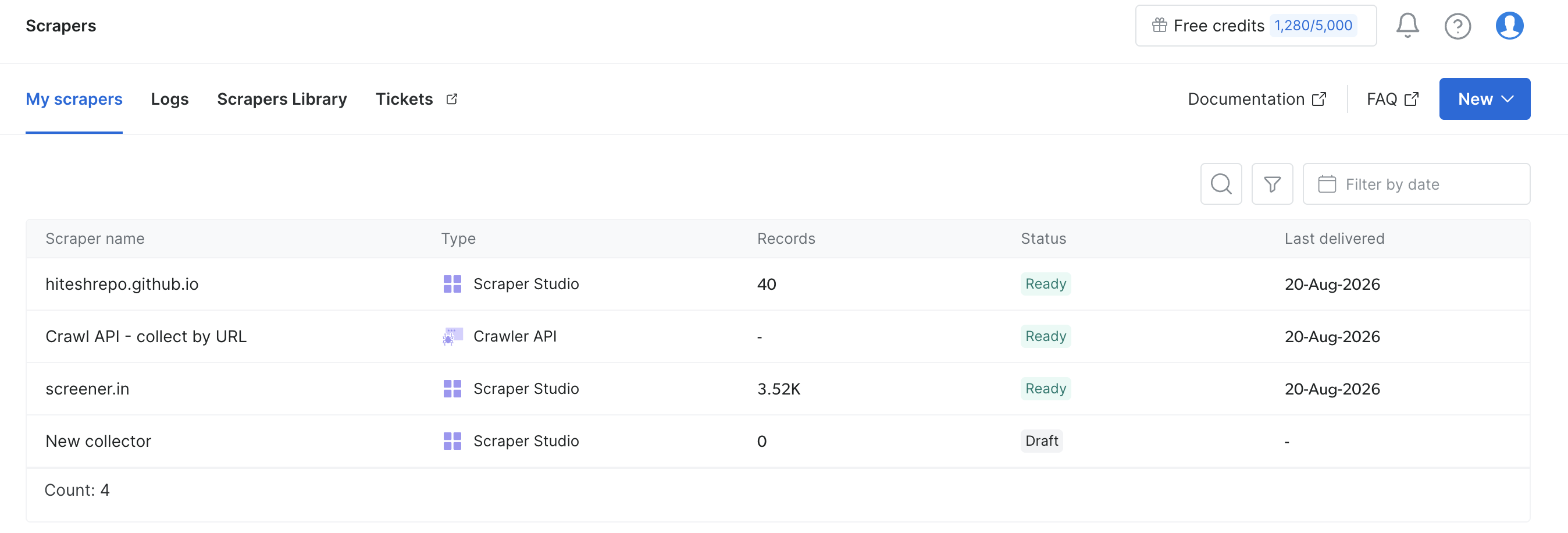
The production collector scrapes the real data source. The demo collector targets a GitHub Pages mirror page I control — more on why below.
Why a Demo Mirror?
To demonstrate self-healing you need to break the scraper on demand. But you can’t control when a real third-party site changes its DOM. So I built a static mirror page hosted on GitHub Pages that alternates between two structurally different HTML layouts on every run.
Both layouts look visually identical in a browser — same table, same data. But the HTML is different in ways that matter to a scraper:
v1 layout:
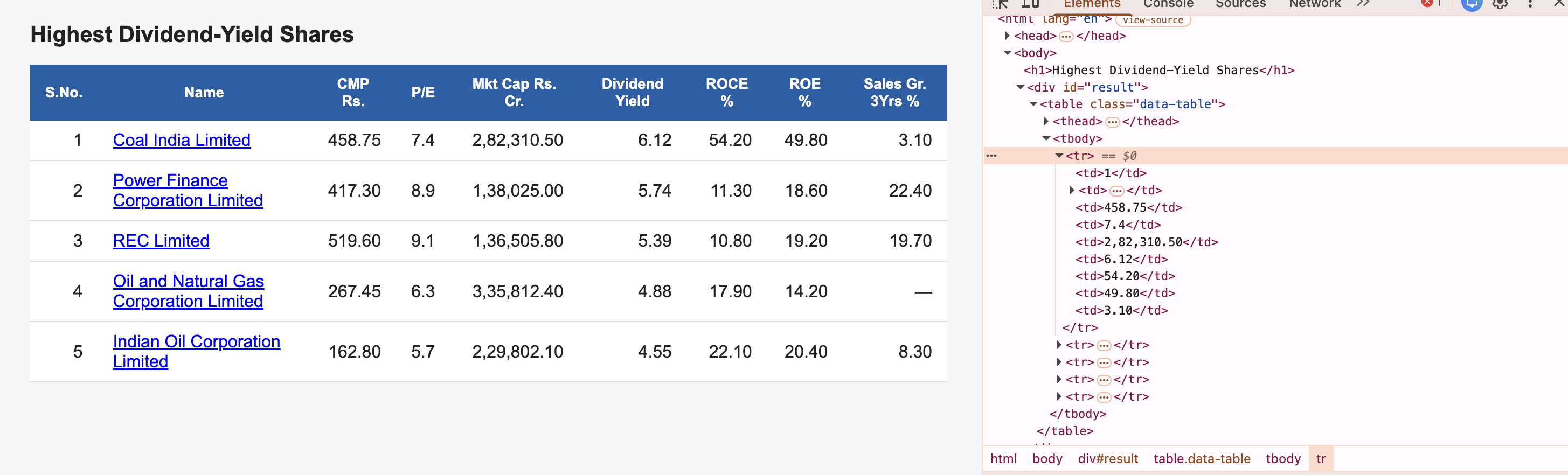
Table class: data-table, container: div#result, bare <tbody>, Dividend Yield at column 6.
v2 layout:
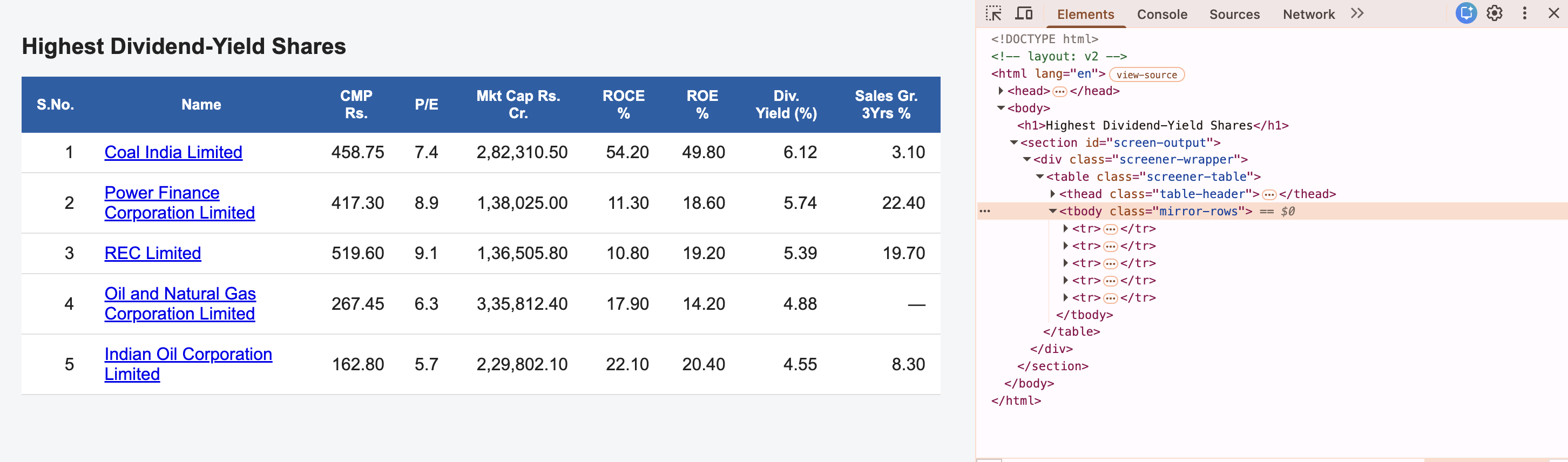
Table class: screener-table, container: section#screen-output, <tbody class="mirror-rows">, columns reshuffled — Dividend Yield moves to column 8.
A break-mirror.yml GitHub Actions workflow swaps index.html between the two layouts on every dispatch. No manual Bright Data reset needed — the demo is fully repeatable.
The Demo Flow
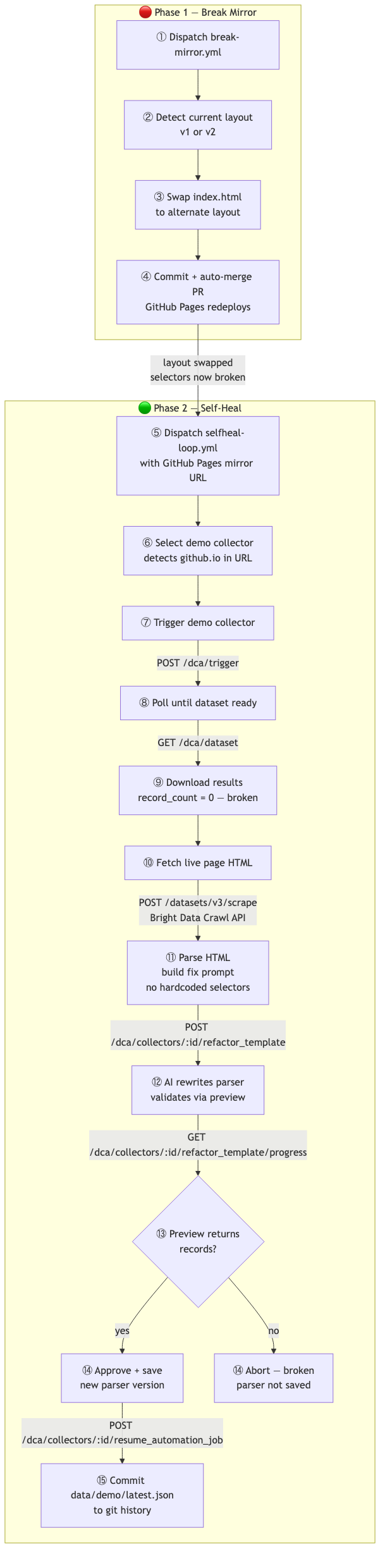
Phase 1 (break-mirror.yml) swaps the layout and triggers a GitHub Pages redeploy. Phase 2 (selfheal-loop.yml) runs the full self-heal cycle against the now-broken mirror.
The Self-Heal in Action
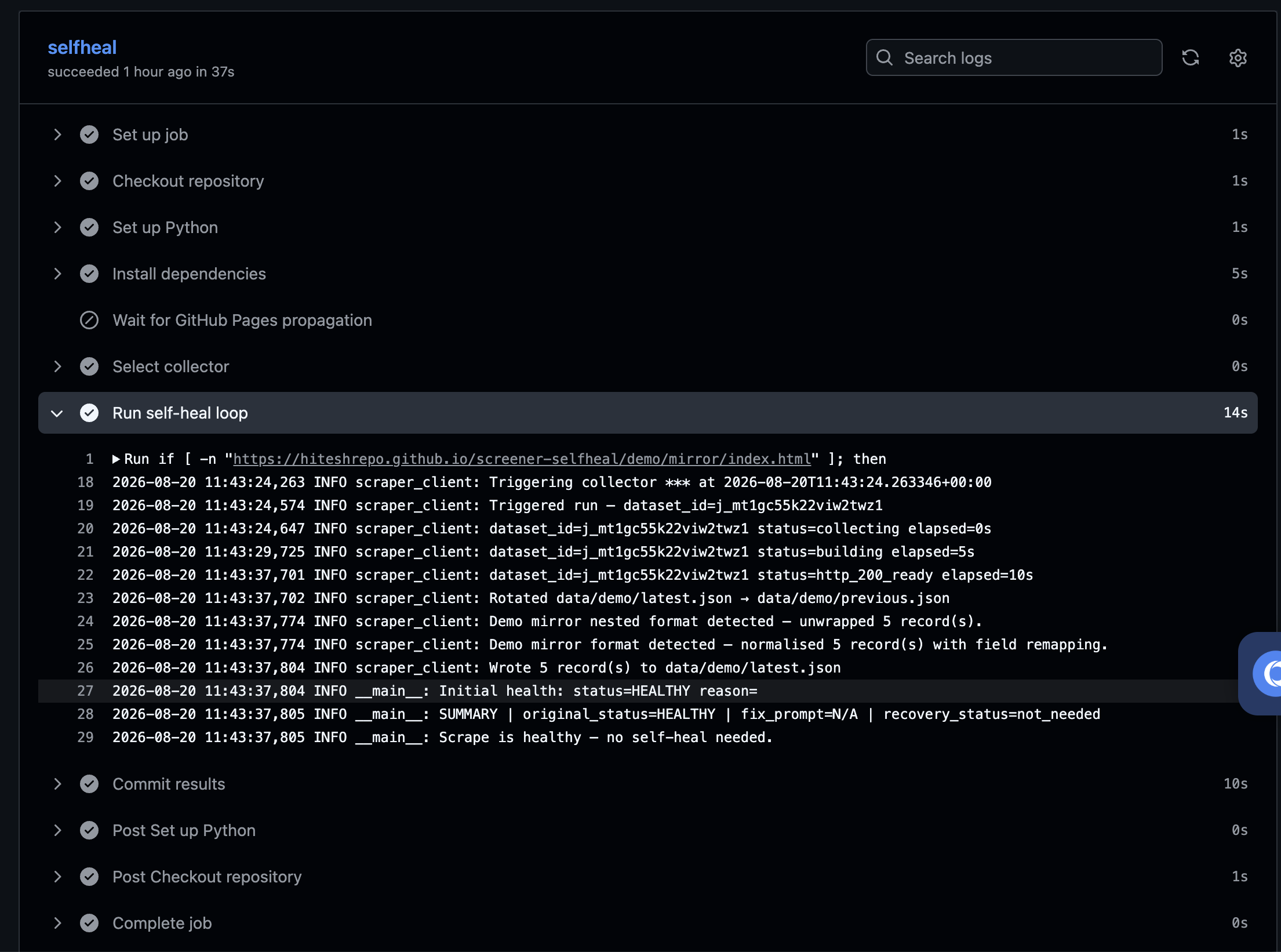
Here’s a GitHub Actions run where the scrape came back healthy — no self-heal needed:
And here’s a run where it detected 0 records, ran the full self-heal loop, and recovered:
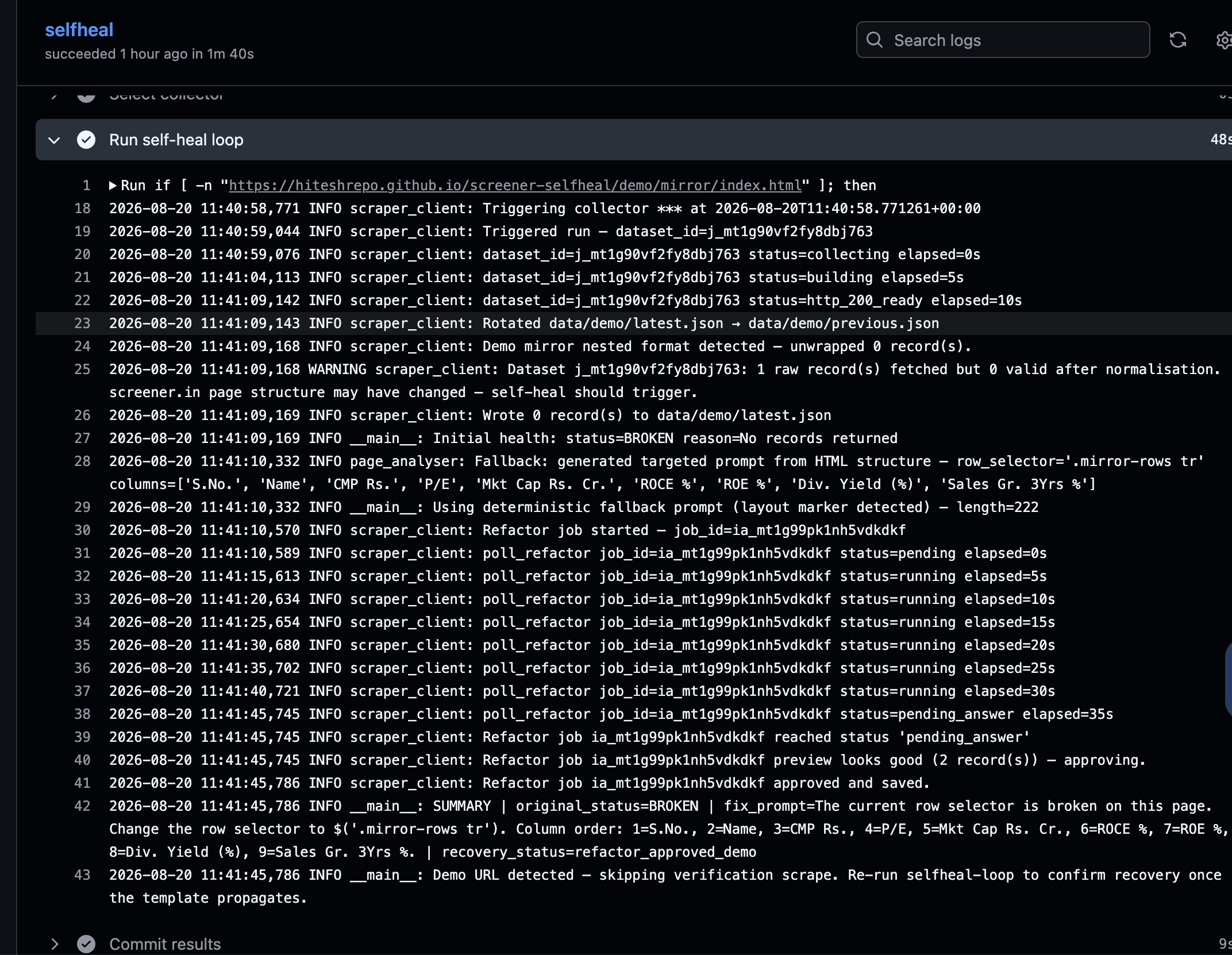
Key lines in the logs:
Initial health: status=BROKEN reason=No records returnedFallback: generated targeted prompt from HTML structure — row_selector='.mirror-rows tr'Refactor job approved and savedrecovery_status=refactor_approved_demo
The Parser Code Bright Data Wrote
After a self-heal, here’s what the parser code in Scraper Studio looks like — rewritten by Bright Data’s AI based on the prompt our pipeline sent:
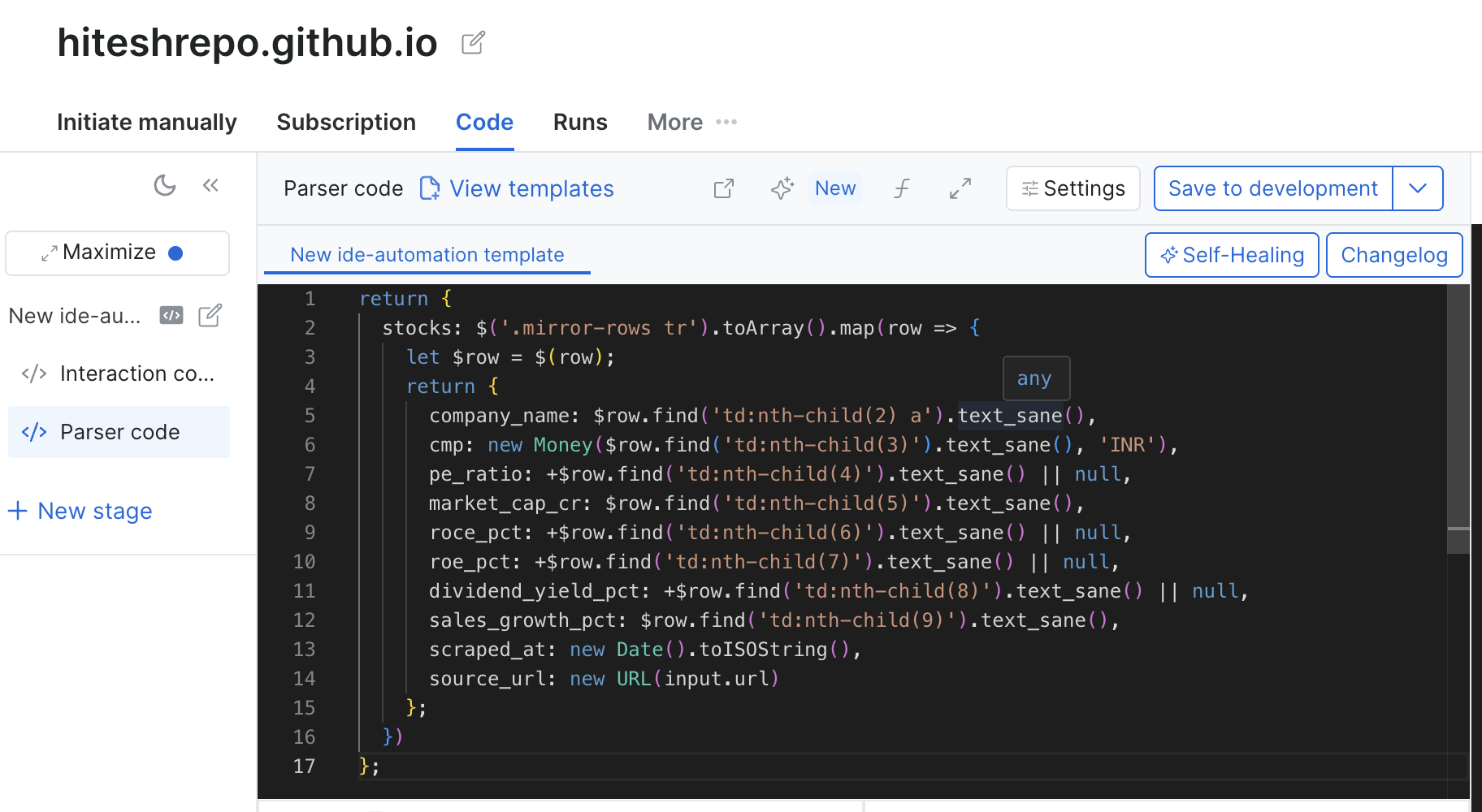
The key change: the row selector is now .mirror-rows tr instead of the old table.data-table tbody tr. The AI also correctly remapped the column indices based on the new order we described in the fix prompt.
Version History — The Proof
Every self-heal cycle creates a new version in Scraper Studio’s changelog:
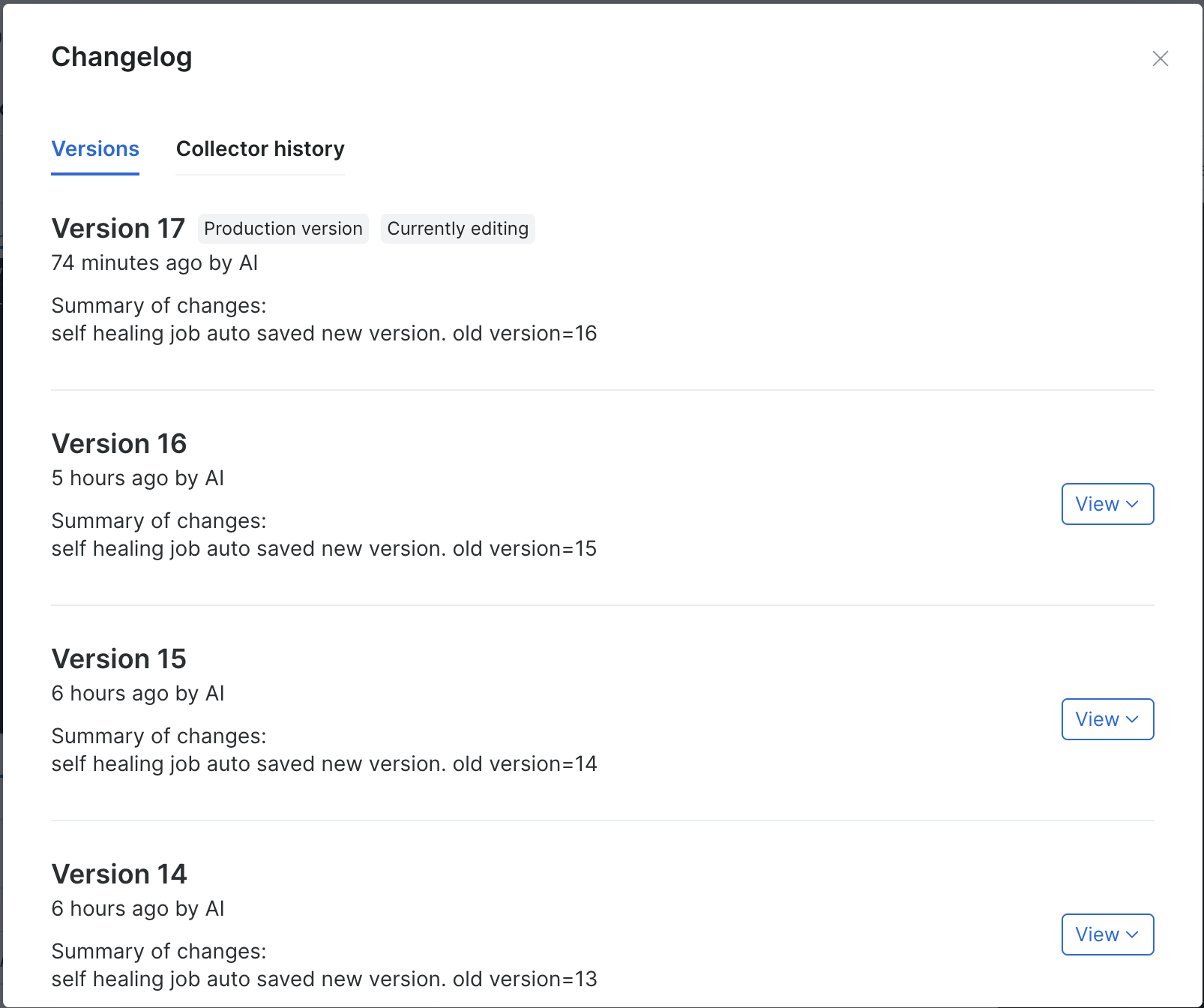
Each version is tagged “by AI” with the summary “self healing job auto saved new version.” This is Scraper Studio’s native versioning — we didn’t build this, it came for free. By the time of the demo the collector had been through 17 versions, 4 of which you can see here.
How the Fix Prompt Works
The key insight behind the self-heal is that we don’t need to know what changed. We just need to read what’s actually in the HTML right now.
def _extract_table_structure(html: str) -> dict | None:
    soup = BeautifulSoup(html, "html.parser")
    table = soup.find("table")
    table_class = (table.get("class") or [""])[0]

    tbody = table.find("tbody")
    tbody_class = (tbody.get("class") or [""])[0] if tbody else ""

    if tbody_class:
        row_selector = f".{tbody_class} tr"
    elif table_class:
        row_selector = f"table.{table_class} tbody tr"
    else:
        row_selector = "table tbody tr"

    thead = table.find("thead")
    columns = [th.get_text(strip=True) for th in thead.find_all("th")] if thead else []

    return {"row_selector": row_selector, "columns": columns}
BeautifulSoup parses the live HTML, finds the table, extracts the actual class names and column headers. We build a prompt like:
“Change the row selector to
.mirror-rows tr. Column order: 1=S.No., 2=Name, 3=CMP Rs., 4=P/E, 5=Mkt Cap Rs. Cr., 6=ROCE %, 7=ROE %, 8=Div. Yield (%), 9=Sales Gr. 3Yrs %.”
That goes straight to Bright Data’s refactor_template API. The AI does the rest.
What I’d Do Differently
- Validate before approving more strictly — the current check is
preview_result returns > 0 records. A stronger check would validate field names and types against the canonical schema. - Alert on repeated failures — if self-heal fails twice in a row, something more fundamental has changed and a human should know.
- Extend to production — the self-heal loop runs against the demo mirror today. The same code works against the production collector — just a different environment variable.
Wrapping Up
Bright Data Scraper Studio’s refactor_template and resume_automation_job APIs made this possible without building a custom LLM pipeline. The Crawl API handled page fetching through IP blocks. The rest was orchestration: detect, analyse, prompt, validate, approve.
The result is a scraper that fixes itself. The git history shows when it ran, what it found, and how the parser evolved. That’s the audit log you want when you’re running a data pipeline in production.
Source: HiteshRepo/screener-selfheal Demo: Watch on Google Drive