TrueForge + Daytona: Setup and Minimal Agent Registration (What the Docs Miss)
I’ve been building divvy-forge — a TrueForge-hosted agent that automates dividend portfolio reviews and opens GitHub PRs with proposed changes. Before any of the interesting agent logic could work, I needed to get TrueForge running locally with Daytona as the sandbox provider and verify that a minimal agent could actually execute code in the sandbox.
This post is a record of that setup — specifically the parts that aren’t obvious from the docs.
Demo video: Watch on YouTube
What TrueForge Is
TrueForge is an open-source, self-hosted agent harness runtime. It’s not a framework you import — it’s the runtime that hosts your agents. Your code lives in MCP tool servers; the agent loop, sandboxed code execution, subagent delegation, and session persistence run inside TrueForge.
It ships as a single npx command and runs on http://localhost:8790 by default. Sandboxed code execution uses Daytona as the provider.
Step 1: Node.js Version
TrueForge requires Node.js 22.14+. If you have an older version it installs fine but crashes immediately (exit code 139) with a wall of npm warn EBADENGINE warnings.
node --version   # needs to be v22.14+

# if using nvm:
nvm use 22
Step 2: Start TrueForge
With OPENAI_API_KEY in your .env, source it before starting TrueForge so the model provider has credentials:
source .env && npx @truefoundry/trueforge
# Agent server listening on http://localhost:8790
The first run runs database migrations and starts in standalone (SQLite) mode — no Redis or Postgres needed locally.
Step 3: Daytona Setup (Where It Gets Interesting)
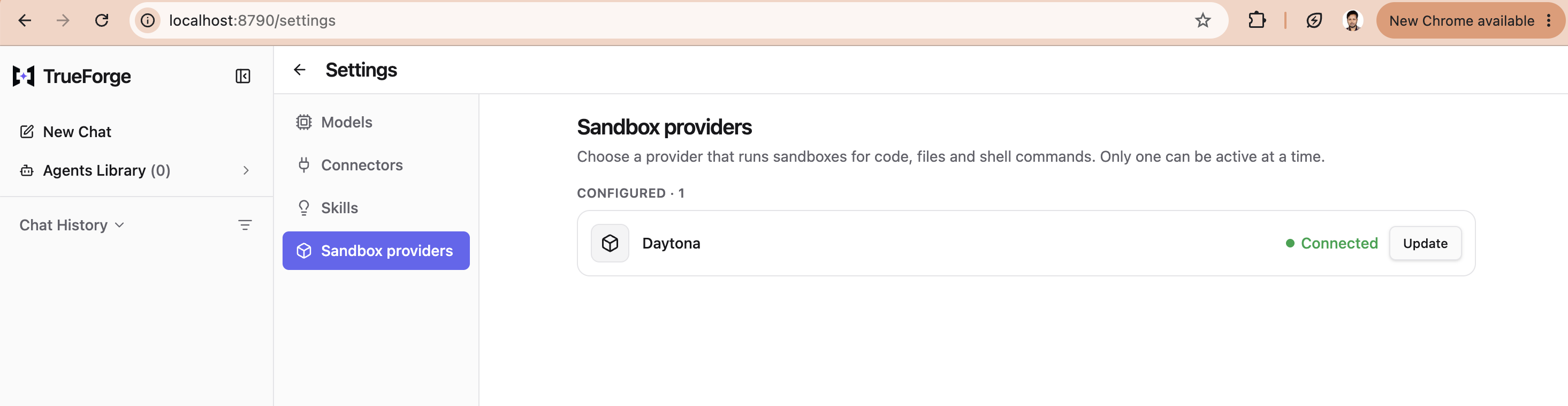
TrueForge uses Daytona for sandboxed code execution. The UI path is Settings → Sandbox providers → Add provider → Daytona → paste API key → Save.
I ran into two non-obvious problems here.
Problem 1: “Daytona rejected the API key”
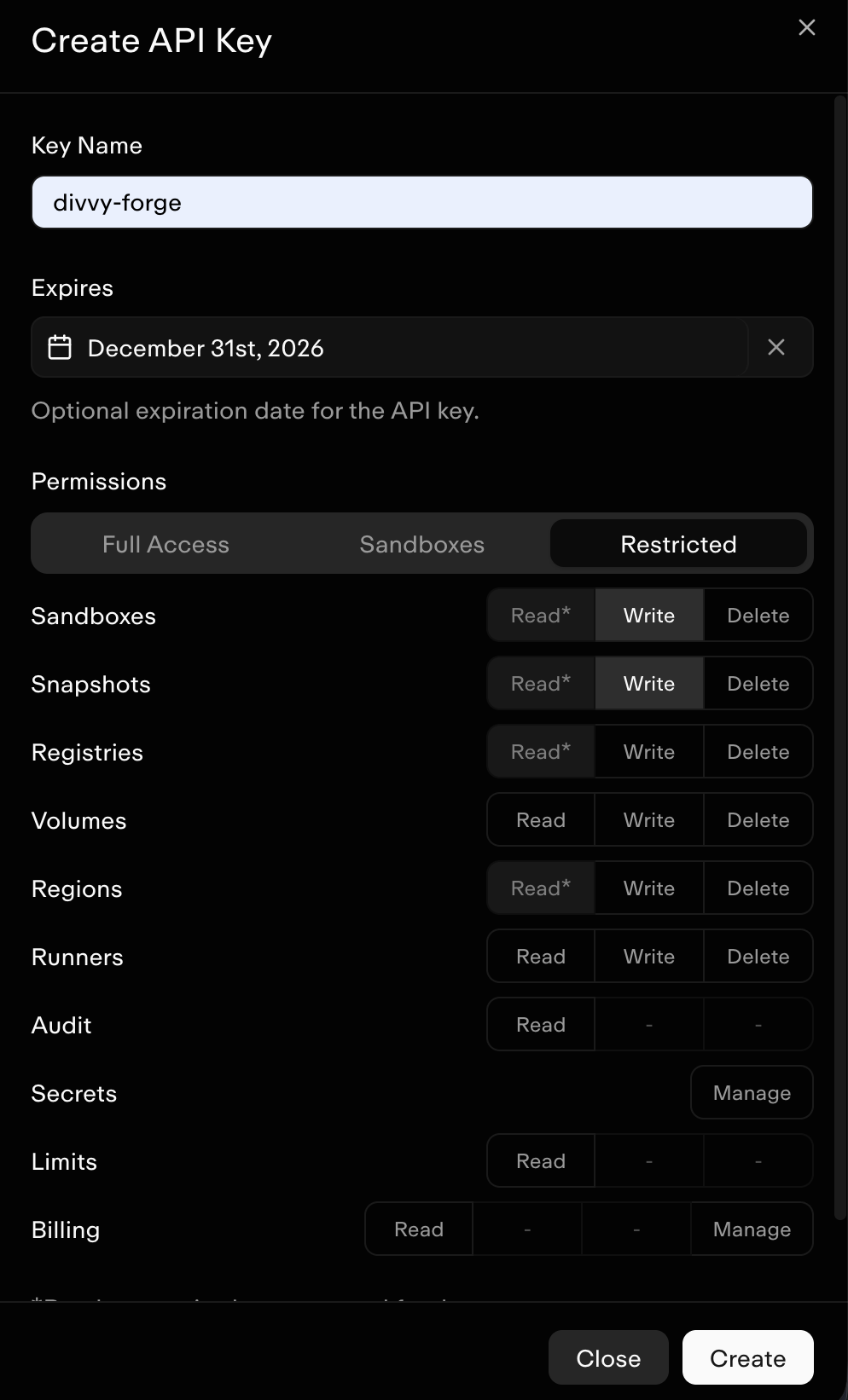
I created a Daytona API key with Sandboxes Access permission and pasted it in. TrueForge immediately showed an error: “Daytona rejected the API key — check the credentials”.
The error message implies the key itself is wrong. It isn’t. The key was valid — I could call GET https://app.daytona.io/api/sandbox with it and get a 200 back.
Root cause: When you click Save, TrueForge doesn’t just validate the key — it immediately calls POST https://app.daytona.io/api/snapshots to register its sandbox Docker image (tfy.jfrog.io/tfy-images/trueforge-sandbox:...). That endpoint requires Snapshots: Write permission. With only “Sandboxes Access”, Daytona returns 403. TrueForge catches the 403 from the Daytona SDK and surfaces it as “rejected the API key” — a misleading message.
I found this by reading DaytonaProvider.js in the TrueForge node_modules:
async registerSnapshot() {
  response = await fetch(`${this.apiUrl}/snapshots`, {
    method: "POST",
    headers: { Authorization: `Bearer ${this.apiKey}`, ... },
    body: JSON.stringify({ name: this.buildRef, imageName: this.imageUri })
  });
  // 401/403 → DaytonaError → "Daytona rejected the API key"
}
Fix: Create the API key with Restricted permissions and enable both:
- Sandboxes: Read + Write
- Snapshots: Read + Write
After recreating the key with Snapshots: Write, TrueForge saved it immediately:
Step 4: Register the Model Provider
Before creating any agents you need to register your model provider via the REST API. The TrueForge UI has a Settings section for this, but if you’re scripting it:
curl -X POST http://localhost:8790/api/v1/settings/model-providers \
  -H "Content-Type: application/json" \
  -d "{
    \"manifest\": {
      \"type\": \"openai\",
      \"auth\": {\"api_key\": \"$OPENAI_API_KEY\"},
      \"models\": [{\"model_id\": \"gpt-4o\", \"name\": \"gpt-4o\", \"properties\": {}}]
    }
  }"
Two things that aren’t obvious:
- The
modelsarray is required — you must explicitly list which models to expose propertiesmust be an object (even if empty) —undefinedfails validation
Step 5: Register an Agent
This is where the TrueForge docs diverged most from reality. Here’s what I learned by hitting errors:
The model field is an object, not a string
The docs and KB show "model": "openai/gpt-4o". The actual API expects:
"model": {"name": "openai/gpt-4o"}
Turn creation uses input array, not userMessage
The docs show {"userMessage": "..."} for creating turns. The real schema:
{
  "input": [{"type": "user.message", "content": "your message here"}],
  "stream": true
}
POST /turns returns SSE directly
There is no separate GET /turns/{id}/stream endpoint. The POST to create a turn is the SSE stream when "stream": true. The first event is turn.created, the last is turn.done (which carries the final output in state.output.content).
Sessions use agent name, not agent ID
{"agent": {"name": "my-agent-name"}}
not {"agentId": "..."}.
All responses are {"data": {...}} wrapped
Every successful response is wrapped in a data envelope. Accessing response["id"] directly will fail — use response["data"]["id"].
Step 6: Smoke Test
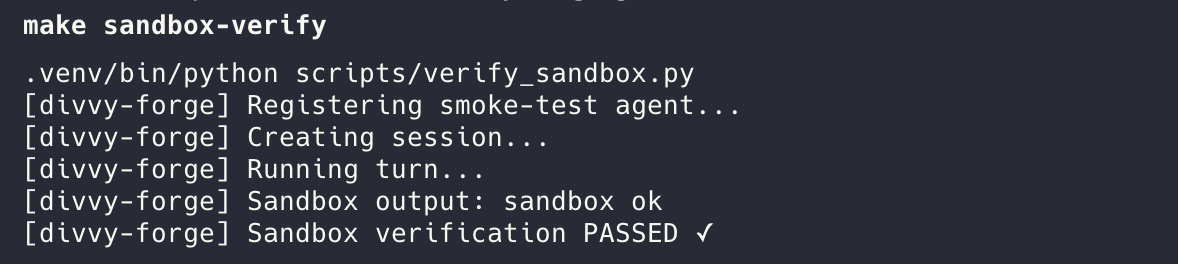
With all of this wired up, a minimal smoke test that deploys a sandbox-enabled agent, sends it a turn, and verifies the Daytona sandbox executes code:
from divvy_forge.trueforge_client import TrueForgeClient, TurnDoneEvent

client = TrueForgeClient(base_url="http://localhost:8790")

# register agent (idempotent)
agent = client.register_agent("smoke-test", {
    "model": {"name": "openai/gpt-4o"},
    "instructions": "When asked to run smoke test, write and execute a Python script that prints 'sandbox ok', then reply with only that output.",
    "config": {"sandbox": {"enabled": True}}
})

# create session and stream a turn
session = client.create_session(agent.name)
for event in client.stream_turn(session.id, "run smoke test"):
    if isinstance(event, TurnDoneEvent):
        print(event.output_content)  # → "sandbox ok"
Running make sandbox-verify:
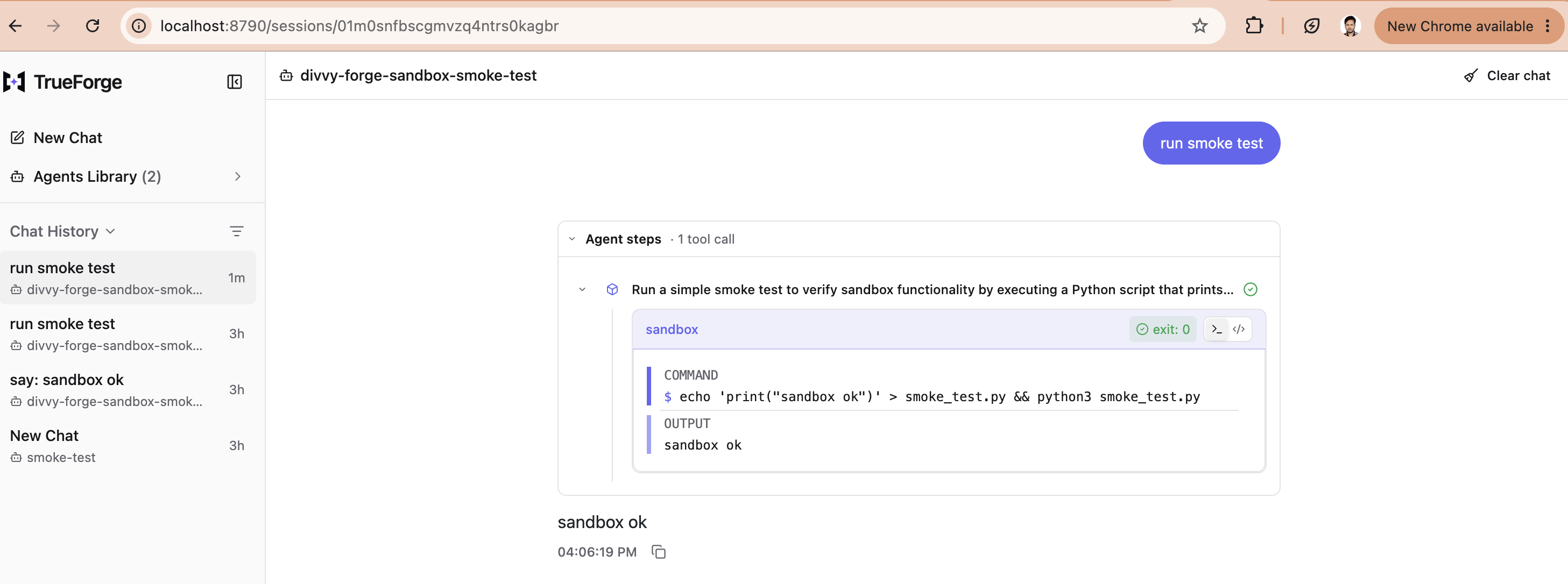
You can also see the same execution through the TrueForge UI — the agent writes smoke_test.py, executes it in the Daytona sandbox, and returns sandbox ok:
Summary of Non-Obvious Issues
| Issue | Root cause | Fix |
|---|---|---|
| Node crash on start | Node.js < 22.14 | nvm use 22 |
| “Daytona rejected the API key” | Snapshots:Write permission missing | Add Snapshots:Write to the API key |
manifest.model 400 error | model must be {"name": "..."} not a string | Use object form |
| Session creation 400 | agentId field doesn’t exist | Use {"agent": {"name": "..."}} |
| Turn creation 400 | userMessage field doesn’t exist | Use input array with user.message type |
No /stream endpoint | SSE streams from the POST response | Use stream: true on the POST body |
| 409 agent conflict has no data | 409 body is just the error message | Fetch existing agent from the list endpoint |
All of these fixes are in the divvy-forge TrueForge client, tested against TrueForge v0.1.4.